GreatWallOfSound
Make room by priority, frequency, and side, across up to eight tracks without routing them through one bus.
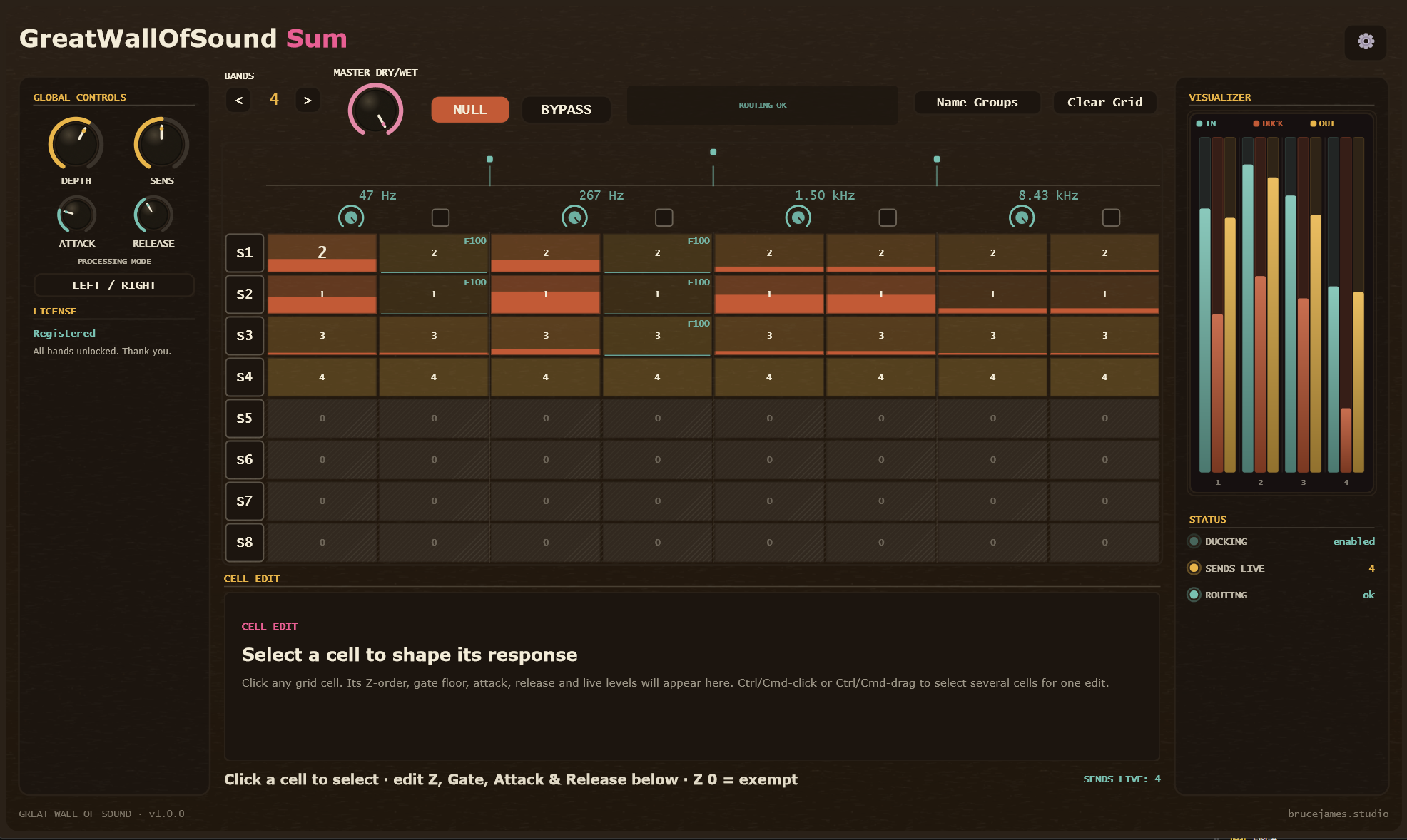
It resolves collisions before they become a bus-shaped compromise.
Put GreatWallOfSound Send on each source that should participate, then put one GreatWallOfSound Sum on a dedicated silent utility track. The plugins communicate locally through shared memory; the source tracks never need to be summed into the control track, and no audio is uploaded.
The Sum divides the spectrum into one to eight adjustable bands, with separate left and right cells for as many as eight sources. Give the material that should lead a higher priority wherever it matters. Higher priorities duck lower priorities, equal priorities leave each other alone, and Priority 0 is exempt.
Each Send applies the published gain changes to its own latency-aligned audio. Inserts, faders, panning, and downstream routing remain independent, while the Sum gives you one place to see and shape the hierarchy. Draggable crossovers let you put resolution around the exact collisions in the arrangement instead of accepting a fixed band layout.
Gate Floor limits how much any selected cell may lose. Per-cell Attack and Release shape the motion; Ducking Groups keep unrelated sources from competing; band and Master Dry/Wet controls blend the correction. Bypass returns every Send to dry unity, while Null plays only what the system removed.
The interface, explained.
The Send keeps each source on its own track. The Sum turns the arrangement into an editable priority map.
Give every source a row
Insert one Send per source and assign each a unique Sum Track. The status panel confirms the Sum, signal, bridge, and routing state at a glance.
Put resolution where the mix needs it
Choose one to eight complementary bands, then drag the crossover handles from 20 Hz to 20 kHz. Every Send follows the same published split points.
Decide what leads
Set priority independently for every track, band, and side. Any higher non-zero priority can duck a lower one; equal values coexist; 0 stays completely exempt.
Protect the minimum
Select one or several cells and set the lowest level they may be ducked to, so making room never means erasing the source.
Shape each collision
Tune how quickly the selected cells move out of the way and return. Global defaults make a fast starting point; cell values handle exceptions.
Limit who competes
Keep unrelated sources out of each other’s hierarchy, or use directional Override when one group should have authority over another.
Blend the correction
Set the overall amount, then back off individual frequency areas without changing the priority map.
Audit the result live
Red cell activity and Input, Duck, and Output meters show what is moving. Solo a source or band to inspect one part of the system.
Prove what changed
Bypass restores dry unity across every Send. Null outputs processed minus dry, isolating only the material GreatWallOfSound removes.
GreatWallOfSound, answered.
What is GreatWallOfSound?
A paired cross-track spectral ducking system. GreatWallOfSound Sum analyzes up to eight participating sources and publishes the priority decisions; GreatWallOfSound Send applies those decisions locally on each source track.
Does source audio pass through GreatWallOfSound Sum?
No. Put Sum on a dedicated silent utility track. The Sends and Sum communicate locally through shared memory, while every source keeps its normal audio routing.
How do priorities work?
Each track, frequency band, and left or right side gets a value from 0 to 8. Any higher non-zero priority ducks a lower priority. Equal priorities do not duck one another, and 0 is fully exempt.
How many tracks and bands can participate?
Up to eight source tracks can use one Sum, split into one to eight adjustable frequency bands. Each band has independent left and right priority cells.
What happens if a Send loses contact with the Sum?
It fails open to clean unity rather than muting the source. The Send status panel reports whether the Sum, signal, bridge, and routing are healthy.
Does GreatWallOfSound add latency?
Yes. It uses lookahead plus a short safety buffer so the duck can engage cleanly before a transient. The Send reports its latency to the host, so plugin delay compensation should remain enabled.
Is any audio uploaded?
No. Audio and control exchange stays local on the computer through shared memory.
Which systems and formats are supported?
Windows includes VST3, CLAP, and AAX; macOS includes VST3, AU, CLAP, and AAX; Linux includes VST3 and CLAP.
Is the free demo limited?
The demo includes the complete system. Ducking pauses briefly from time to time until you buy it, but the dry source audio is never muted.
Turn the arrangement into a priority map.
Put Sends on the tracks that are fighting, give Sum a silent utility track, and decide what should lead in each part of the spectrum.