Now shipping for Avid VENUE consoles: 64-bit AAX DSP, FOH and Monitor, one purchase.
AAX DSP · Avid VENUE

HotPressor for VENUE

Squash a live vocal flat on the console itself. No laptop in the insert, no interface round trip.
Secure checkout via Shopify · licence key emailed instantly
One purchase covers both console variants, and the same licence unlocks the DAW build (VST3 · AU · CLAP · AAX Native) when it leaves early access.
v1.0.0 · FOH + Monitor · 64-bit AAX DSP
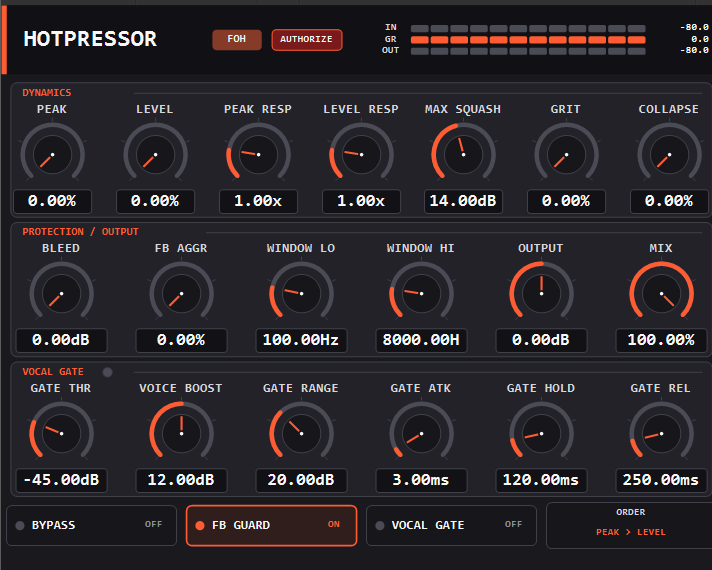
HotPressor AAX DSP plug-in on Avid VENUE, showing dynamics, protection and vocal gate rows
The on-screen panel · HotPressor FOH on VENUE
Why this build exists

On an S6L, this is the only kind of plug-in that loads.

Avid VENUE consoles run 64-bit AAX DSP only. They do not load AAX Native, and they do not load Hybrid. So a native VST3 or AAX plug-in cannot go on an S6L at all, however good it sounds: the usual workaround is a laptop running a plug-in host, patched into a channel insert through an interface, with the round trip and the extra failure point that implies.

This build is the other answer. It is a separate binary compiled for the console's own TI DSP chips, and it inserts on a channel like any stock VENUE processor. No laptop in the signal path, no interface, no extra thing to go wrong at 8pm.

One bundle installs both plug-ins. HotPressor FOH goes for polish; HotPressor Monitor runs gentler and errs open, because a dropout in someone's in-ears is fatal. They stay separate on purpose, so a monitor rig can never sit in FOH mode by accident. Control-surface page tables are included for both S6L and S3L-X.

Authorization

It authorizes offline, because your console has no business being online.

There is no network code in this plug-in at all. That is deliberate: VENUE rigs are routinely air-gapped, and a show is not the place to discover a licence server is unreachable. The handshake is copy and paste, done once.

1

Insert it and hit AUTHORIZE

An unauthorized plug-in shows an AUTHORIZE badge in its header. Click it and it shows you a request code starting BJREQ1.

2

Take the code to any device with internet

Your phone is fine. Go to brucejames.studio/offline, pick HotPressor, and enter your purchase email and licence key along with that request code.

3

Paste the reply back in

You get an activation code starting BJLIC1. Paste it into the same panel on the console. It takes effect immediately: no rescan, no session reload, no restart.

Unauthorized never mutes your audio. It is a clean pass-through, exactly as if Bypass were engaged, and the declared latency is identical either way. If you see the badge mid-show you have a plug-in doing nothing, not a dead vocal.

It is verified entirely on the console. The code is signed and bound to that machine, so nothing has to be reachable for it to check out: not at load, not at soundcheck, not mid-show. Re-issuing a code for the same console is free and does not spend a seat, so you can refresh it whenever suits you.

One purchase covers two consoles. FOH and Monitor often live on two different desks, so a purchase carries two offline authorizations. Your DAW machine doesn't spend either one: if it can reach the internet it activates normally, and that is a separate allowance of three computers.

An offline authorization ends the 14-day refund window for that purchase, because it cannot be checked back in once issued. Try the DAW demo on a laptop first.

⚠ Before you buy, the honest bit.

This is the first release of the console build, and a live rig is the worst place to be surprised. So, plainly:

  • Each instance takes a DSP chip to itself. This release reports no worst-case cycle counts, so the DSP shell gives it a whole chip rather than packing it in beside other plug-ins. That is the safe direction, and it is deliberate: a plug-in that claims a budget it has not measured is one that can miss its deadline on a busy chip, and missing a deadline at a show is not a bug you want to find out about from the audience. It does mean your instance count is capped by how many chips your engine has, not by how much of each one HotPressor really uses. Measuring that properly is the next job, and it lifts the cap in a free update.
  • There is no demo on the console. An unauthorized install passes audio clean but does nothing, so it is safe to put on a channel during soundcheck: it just will not compress until you authorize it. To actually hear the plugin first, run the free DAW demo on a laptop.
  • Feedback Guard is deliberately cautious, tuned so it never notches a singer's actual voice. On clean sustained ringing it grabs and holds. On messy real-world feedback that is distorted or wandering, it can be slow to catch or miss entirely. That tuning is still being worked on.
  • Mono only in this release. No stereo, no spectrum display, no RTA sidechain.
  • The on-screen panel appears in VENUE's Zoom view; the physical surface uses the included page tables.
Formats
64-bit AAX DSP (FOH + Monitor)
Systems
Avid VENUE | S6L · VENUE | S3L-X
Version
v1.0.0
Price
$59.99 · covers the DAW build too
Questions

HotPressor on VENUE, answered.

Why can't I just use the normal VST3 or AAX version on my S6L?

VENUE consoles load 64-bit AAX DSP plug-ins only. They do not support AAX Native or Hybrid at all, so a native build cannot run on the console under any setting. Running a native build at a show means hosting it on a computer patched into a channel insert through an interface.

Does one purchase cover both the console build and the DAW build?

Yes. It is one product and one licence. The console build and the DAW build read the same licence file and derive the same machine ID, so authorizing one machine covers both formats on it. The DAW build is in early access right now and is included when it ships.

How do I authorize a console that has no internet connection?

The plug-in shows a request code starting BJREQ1. Take it to any device that does have internet, redeem it at brucejames.studio/offline, and paste the returned BJLIC1 code back into the plug-in. Nothing needs to connect from the console. Re-issuing a code for a console you have already authorized is free and does not use another seat.

What happens if it is not authorized during a show?

It passes audio through clean, exactly as if it were bypassed, with identical declared latency. It never mutes the channel and never drops the vocal.

How many instances can I run on one engine?

Fewer than later versions will allow. This release reports no worst-case cycle counts, so the DSP shell gives each instance a chip of its own instead of sharing one. That is deliberate: a plug-in scheduled onto a chip using a budget nobody measured is how you lose audio mid-show. Your ceiling is therefore the number of DSP chips your engine has. Measuring the real figures is the next piece of work, and it raises that ceiling in a free update.

Is HotPressor FOH different from HotPressor Monitor?

Yes, and they install as two separate plug-ins from one bundle. FOH goes for maximum polish. Monitor compresses more gently, because singers need dynamics to pitch, and errs open so in-ears never drop out. Keeping them separate means a monitor rig cannot accidentally sit in FOH mode.

Put it on the vocal channel.

One purchase, both console variants, and the DAW build when it ships. Authorize once, offline, and forget about it.

FOH + Monitor · 64-bit AAX DSP · VENUE | S6L and S3L-X · all downloads