MDA
One shared compression decision across every track, without summing them into one bus. Four ways to decide who gets squeezed.
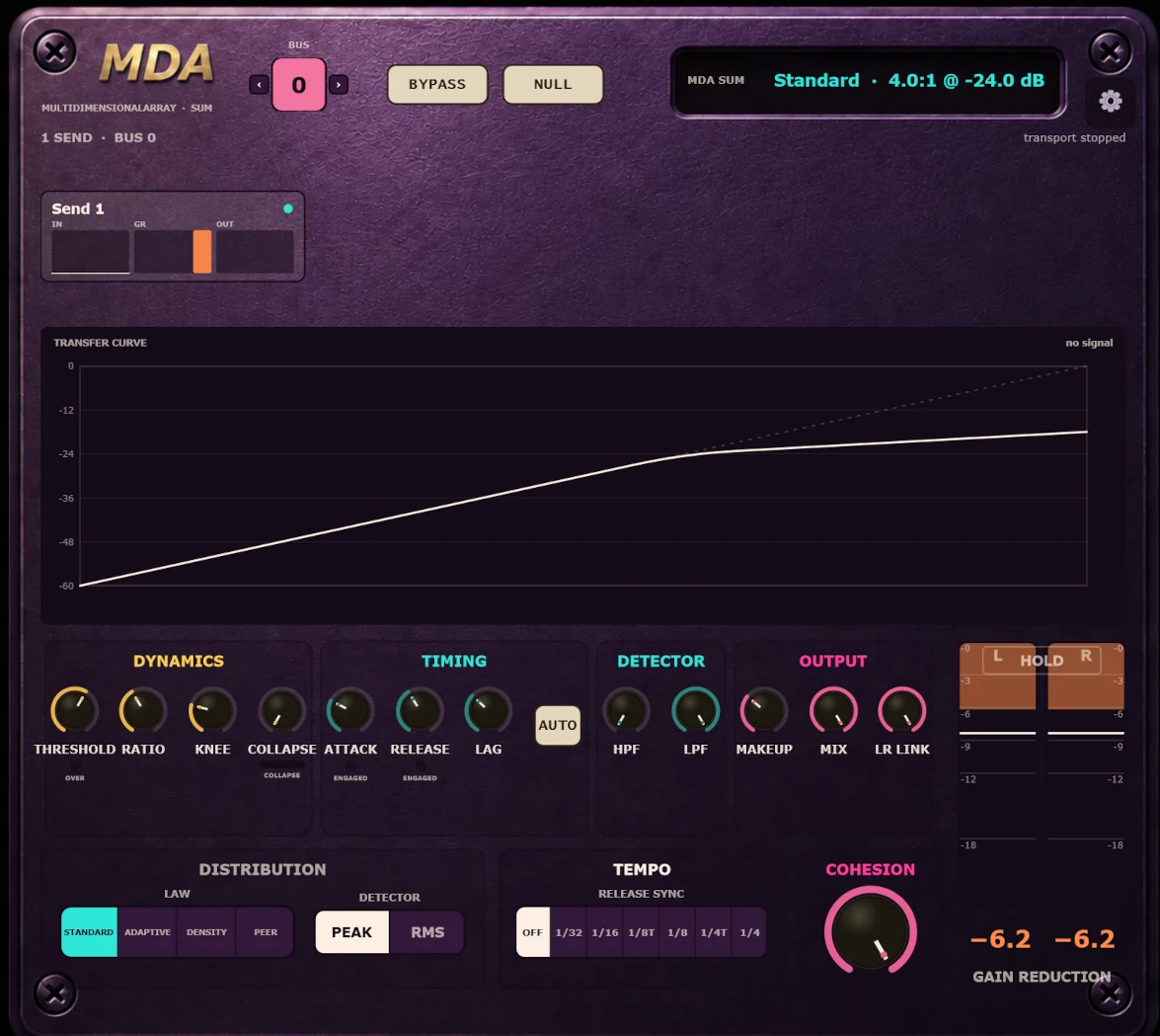
It can react to the arrangement, not just a flattened copy of it.
Put MDA Send on every source that should participate, then put one MDA Sum on a blank track. Match their colour-coded Bus numbers and you are done: no aux bus, no sidechain routing, and no guessing which version of the signal the compressor is hearing. The Sum’s connection panel shows every live Send and the reduction each one is actually receiving.
The Sends publish their detector view to the Sum; the Sum publishes one shared law back. Each Send then applies the result to its own latency-aligned audio, so the tracks, faders, inserts and downstream routing stay separate. If a Sum disappears or a Bus does not match, MDA fails open and the Send passes clean audio instead of muting the track.
Density is the reason this architecture exists. One track crossing threshold is treated gently; as more Sends cross together, the effective ratio rises until the whole arrangement clamps as one. A normal bus compressor cannot do that because after summing, it no longer knows whether one track peaked or twelve did.
Unison moves continuously between two useful endpoints. Independent lets every Send detect its own track under the shared settings. Joined lets the Sum’s combined detector drive every Send with one gain envelope. This is mathematically the same result as compressing the summed mix, without moving the plugins or rebuilding the routing. Everything between blends those two decisions at audio rate.
The interface, explained.
The Sum owns the law. The Sends decide how their own tracks are heard by that law.
See the closed loop
The Sum shows which Sends are alive on this Bus, where the summed signal sits on the transfer curve, and the deepest reduction any Send is applying. Under the independent laws, the tracks can disagree by design.
Four distribution laws
Standard applies the dialled law per track. Adaptive steepens the ratio as a track pushes farther over. Density reacts to how many Sends cross together. Peer squeezes tracks that rise above the group mean.
A continuum, not a link switch
Independent uses each Send’s detector. Joined uses the Sum’s combined detector and is algebraically identical to compressing the mix. The middle blends both reduction decisions.
One shared compression law
Set the curve once for the entire Bus, with continuous 1:1–20:1 ratio, a 0–24 dB knee, and linked Peak or RMS stereo detection.
Timing that follows the music
Attack runs from 0.03–100 ms. Auto Release brackets the dialled release from ¼× on transients to 4× on sustained material; Sync locks it to the host from 1/32 through 1/4, including triplets.
Tell the law how to hear this track
Trim drives both the local detector and compressed path. The 12 dB/oct HPF and LPF filter only what this track’s compressor listens to, never its audio, so a kick and hi-hat can share one law without sharing one sidechain.
Character and finish
Collapse adds up to 4 dB of fast extra reduction on hard hits, then blooms back. Makeup restores level; Mix blends against the latency-aligned dry path.
Prove it and keep it safe
Null makes every Send output processed minus aligned dry so you hear only the change. Bypass keeps latency stable, and 16 colour-coded Bus values let multiple MDA groups run independently.
Watch it blend from individual tracks to one bus.
Unison walked from end to end on a real session: Independent, where every Send detects its own track, through to Joined, where one shared envelope moves the whole group.
MDA, answered.
What is MDA?
MDA is a cross-track compressor. One MDA Sum makes the shared compression decision, while MDA Send applies that decision independently on every participating track.
Does audio pass through MDA Sum?
No. Put MDA Sum on a blank track. It observes the matching Sends and publishes control data back to them; the source audio continues through the tracks carrying MDA Send.
How are the four Distribution laws different?
Standard applies the Sum settings independently to every track. Adaptive progressively raises a track’s ratio as it pushes farther over threshold. Density scales the ratio by how many Sends are over threshold together, from gentler when one is alone to harder when the whole group hits. Peer raises compression on tracks that sit above the group mean.
What does Unison do?
At Independent, each Send detects its own track under the shared settings. At Joined, the Sum’s combined detector drives every Send with one gain envelope, mathematically the same as compressing the summed mix. Intermediate values blend both gain-reduction decisions at audio rate.
Does MDA add latency?
Yes. The Send-to-Sum-to-Send control loop requires four host blocks of latency, about 43 ms at a 512-sample buffer and 48 kHz. MDA reports that latency to the host, so keep plugin delay compensation enabled. Bypass stays aligned and does not move the track in time.
What happens if a Send cannot find its Sum?
The Send fails open and passes clean audio. Its window says that no Sum was found on the selected Bus and can point out other active Bus numbers, so a mismatch is visible without making it look like the audio is broken.
How do I create more than one MDA group?
Set each Sum and its participating Sends to the same Bus number. MDA provides 16 bus values, so separate groups can operate independently in one session.
Which systems are available?
MDA 1.0.0 is available now for Windows, macOS, and Linux. Windows includes VST3, CLAP and AAX; the macOS universal build adds AU; Linux includes VST3 and CLAP.
Try the compressor that knows how many tracks just hit.
Start with Density: put a Send on a few tracks, the Sum on a blank track, and hear the group tighten harder as the arrangement fills in.